


To provide the most accurate version of this article, current real-time information about Chrome extensions, Chrome Web Store listings, recent updates, RAM optimization features, and browser compatibility should first be verified online.
Introduction
If your Chrome browser slows down after opening several tabs, you’re not alone. Chrome remains one of the fastest and most feature-rich browsers available today, but it is also famous for consuming a large amount of system memory. At the same time, modern websites constantly collect browsing data using cookies, trackers, fingerprinting techniques, and advertising scripts. These background processes not only raise privacy concerns but also consume additional CPU power and RAM, making browsing noticeably slower.
Fortunately, a handful of carefully selected Chrome extensions can solve both problems simultaneously. Some extensions stop hidden trackers before they load, reducing unnecessary network requests and improving page speed. Others intelligently suspend inactive tabs, freeing hundreds or even thousands of megabytes of RAM without forcing you to close your work. The result is a browser that feels faster, cleaner, and far more private.
This guide explores the best Chrome extensions available in 2026 for blocking trackers while reducing memory usage. You’ll learn what each extension does, who it is best for, and how to combine them safely without creating conflicts. Whether you use Chrome for work, study, gaming, or everyday browsing, these tools can help you enjoy a smoother experience while protecting your online privacy.
Why Privacy and Browser Performance Matter More Than Ever
Every website you visit leaves behind a trail of information. Advertising networks, analytics platforms, social media widgets, and embedded scripts silently collect data about your browsing habits. This information helps companies personalize advertisements, but it also increases page loading times because every tracker requires additional network requests and processing power.
Chrome itself is designed to isolate each tab into its own process for better stability and security. While this architecture prevents one crashed tab from taking down the entire browser, it also increases RAM consumption. Open twenty or thirty tabs, and Chrome can easily use several gigabytes of memory. On laptops with limited RAM, this often causes sluggish performance, noisy cooling fans, and reduced battery life.
The good news is that blocking trackers reduces unnecessary scripts, while tab management extensions reclaim unused memory. Together, they create a browsing environment that is not only faster but also significantly more private.
How We Chose the Best Chrome Extensions
Selecting the right Chrome extension isn’t simply about popularity. Many extensions promise dramatic improvements but deliver very little. Others request excessive permissions or have questionable privacy practices. To identify the best options, we considered several important factors.
First, privacy protection was essential. Extensions needed to effectively block advertising trackers, fingerprinting scripts, and third-party cookies without breaking most websites. Reliable update frequency and transparency were also important because browser security changes regularly.
Second, we evaluated memory efficiency. The ideal extension should save RAM rather than consume excessive resources itself. Lightweight extensions that use minimal background processes naturally ranked higher.
Finally, usability played a significant role. Beginners should be able to install and configure an extension within minutes. Clear interfaces, sensible default settings, and compatibility with Manifest V3 were additional advantages that influenced our recommendations.
Best Chrome Extensions to Block Tracking
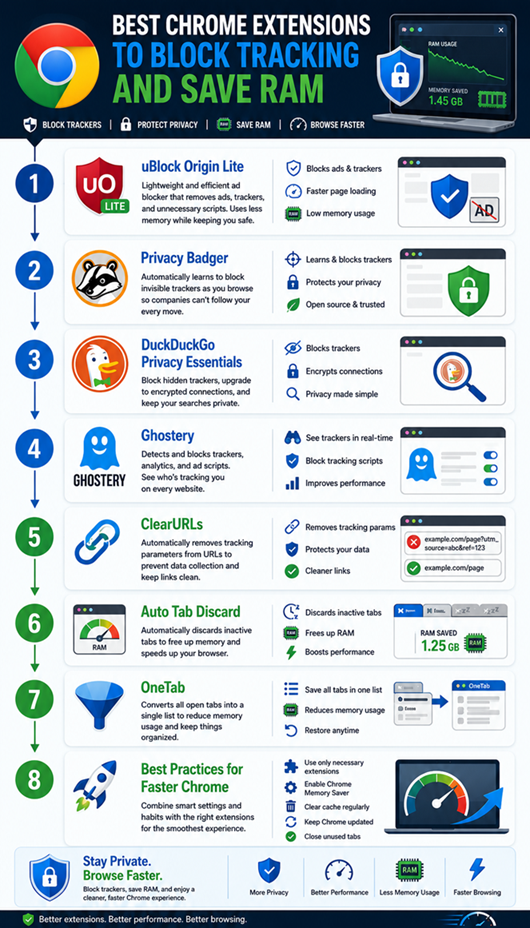
uBlock Origin Lite
Unlike traditional ad blockers, uBlock Origin Lite is designed specifically for Chrome’s Manifest V3 extension framework. It blocks advertisements, malicious domains, and many tracking scripts while maintaining impressive efficiency. Because it uses Chrome’s built-in filtering system, it consumes fewer resources than many older blockers.
The extension requires almost no configuration for average users. Simply install it, choose your preferred filtering level, and continue browsing. Most websites load noticeably faster because advertising scripts never execute.
For users who value speed, privacy, and minimal RAM usage, this is one of the strongest choices currently available.
Privacy Badger
Developed by the Electronic Frontier Foundation, Privacy Badger works differently from conventional ad blockers. Instead of relying exclusively on filter lists, it automatically learns which domains appear to be tracking your browsing behavior and blocks them.
This adaptive approach makes Privacy Badger particularly useful against new tracking methods that may not yet appear on traditional block lists. It also avoids blocking harmless content unnecessarily, helping websites continue functioning normally.
Privacy-conscious users who want intelligent tracking protection without constant manual adjustments will appreciate this extension.
DuckDuckGo Privacy Essentials
DuckDuckGo Privacy Essentials combines tracker blocking, encrypted connection upgrades, and privacy ratings into one lightweight extension. It offers an excellent balance between simplicity and effectiveness.
The extension clearly displays each website’s privacy grade before and after protection. This helps users understand how many hidden trackers were removed during loading.
Because of its clean interface and beginner-friendly design, it remains one of the easiest privacy tools to recommend.
Ghostery
Ghostery is one of the most popular privacy extensions available for Chrome. It blocks advertising trackers, analytics scripts, and social media widgets.
Unlike many privacy tools, Ghostery also shows which trackers are running on each website. This transparency helps users understand how their browsing data is being collected.
ClearURLs
ClearURLs helps protect your privacy by removing unnecessary tracking parameters from web links. These extra parameters are often added by advertisers and analytics platforms to monitor your browsing activity.
When you click a link, the extension automatically cleans the URL before the page loads. As a result, you get a shorter, cleaner link without most tracking identifiers.
ClearURLs does not block ads or trackers directly. Instead, it prevents many websites from collecting extra information through tracking parameters, making it an excellent companion to other privacy extensions.
The extension is lightweight and runs quietly in the background. It uses very little memory, so it won’t slow down Chrome or affect your browsing experience.
If you frequently browse shopping sites, news websites, or social media platforms, ClearURLs is a smart addition. It keeps your links clean, improves privacy, and works well alongside tools like uBlock Origin Lite or Privacy Badger.
Best Chrome Extensions to Save RAM
Auto Tab Discard
If you keep dozens of tabs open, Auto Tab Discard can dramatically reduce Chrome’s memory usage. It automatically unloads inactive tabs after a set period.
The tab stays visible in your browser, but Chrome releases the memory used by that page. When you click the tab again, it reloads automatically.
OneTab
OneTab takes a simple but effective approach to reducing Chrome’s memory usage. Instead of keeping every tab open, it converts all your tabs into a single organized list with one click.
This instantly frees up RAM because Chrome no longer has to keep those webpages active. You can restore individual tabs or the entire list whenever you need them.
OneTab is especially useful for students, researchers, writers, and professionals who often work with dozens of tabs. It helps keep your browser organized while improving overall performance.
Another advantage is its clean and minimal interface. It requires almost no setup, making it ideal for beginners and experienced users alike.
If you regularly keep many tabs open, OneTab is one of the easiest ways to make Chrome faster and more responsive while reducing memory usage.
The Great Suspender Original Fork
After the original version of The Great Suspender was discontinued due to security concerns, trusted community forks emerged to continue its core functionality. The Original Fork restores automatic tab suspension while maintaining better transparency and security practices. Similar to Auto Tab Discard, inactive tabs are suspended after a configurable period, reducing RAM usage without forcing users to manually organize their browser. The extension also allows users to exclude pinned tabs, media playback pages, and frequently visited websites from suspension. This flexibility makes it attractive to power users who maintain complex browsing workflows. The interface remains clean, the options are easy to understand, and the extension performs consistently even when hundreds of tabs are open. Before installing any community-maintained browser extension, however, users should always verify that they are downloading the trusted version from the Chrome Web Store. Doing so ensures they receive security updates and avoid unofficial copies that may not follow the same privacy standards.
Comparison Table
| Extension | Primary Purpose | Privacy Protection | RAM Saving | Best For |
| uBlock Origin Lite | Ad and tracker blocking | Excellent | Moderate | Fast browsing with minimal overhead |
| Privacy Badger | Intelligent tracker blocking | Excellent | Moderate | Privacy-focused users |
| DuckDuckGo Privacy Essentials | Tracker blocking and HTTPS upgrades | Very Good | Moderate | Beginners |
| Ghostery | Advanced tracker detection | Excellent | Moderate | Users wanting detailed tracker insights |
| ClearURLs | Removes tracking parameters | Good | Low | Clean and shareable URLs |
| Auto Tab Discard | Automatic tab suspension | No | Excellent | Heavy multitaskers |
| OneTab | Tab organization and memory reduction | No | Excellent | Researchers and students |
| The Great Suspender Original Fork | Automatic tab suspension | No | Excellent | Power users |
How to Choose the Right Extension
The ideal extension depends on your browsing habits. If privacy is your top priority, pairing uBlock Origin Lite with Privacy Badger provides strong protection without significantly increasing browser resource usage. Users who frequently visit advertising-heavy websites may also appreciate Ghostery’s detailed tracker reports. On the other hand, if Chrome slows down because you keep dozens of tabs open, Auto Tab Discard or OneTab will likely have a much greater impact on performance than installing another content blocker. You should also avoid installing multiple extensions that perform the exact same function, as overlapping features can create conflicts or unnecessary background activity. Instead, combine one reliable privacy extension with one memory management tool to achieve the best balance between security, speed, and stability.
Best Practices for Maximum Performance
Installing the right extensions is only part of the solution. Chrome itself includes several built-in features that help improve efficiency. Regularly updating Chrome ensures you benefit from the latest security improvements and performance optimizations. Removing extensions you no longer use also prevents unnecessary background processes from consuming resources. Chrome’s built-in Memory Saver mode can automatically free memory from inactive tabs, making it an excellent companion to lightweight privacy extensions. Keeping the number of active extensions small reduces startup time and minimizes compatibility issues. Finally, restarting Chrome occasionally clears temporary processes and helps maintain consistent performance during long browsing sessions.
Conclusion
Finding the right balance between privacy and performance has never been more important. Modern websites are filled with advertising networks, analytics platforms, and hidden trackers that quietly consume resources while collecting browsing data. At the same time, Chrome’s multi-process architecture, although excellent for stability and security, can quickly exhaust available RAM when many tabs remain open. Fortunately, carefully selected browser extensions solve both problems without requiring advanced technical knowledge. uBlock Origin Lite, Privacy Badger, DuckDuckGo Privacy Essentials, Ghostery, and ClearURLs provide excellent privacy protection, while Auto Tab Discard, OneTab, and The Great Suspender Original Fork dramatically reduce memory usage for heavy multitaskers. Combining one privacy extension with one RAM-saving extension gives most users the best overall experience. With a cleaner browser, fewer trackers, and lower memory usage, Chrome becomes faster, more responsive, and far more enjoyable to use throughout the day.
Frequently Asked Questions
1. Can Chrome extensions actually reduce RAM usage?
Yes. Extensions like Auto Tab Discard and OneTab unload inactive tabs or convert them into saved lists, significantly reducing Chrome’s memory consumption.
2. Is it safe to install multiple privacy extensions?
Using one or two complementary privacy extensions is generally safe. Installing several extensions with overlapping functions may cause conflicts or unnecessary resource usage.
3. Which Chrome extension is best for blocking trackers?
uBlock Origin Lite is one of the best choices for most users because it combines strong tracker blocking with excellent performance.
4. Does blocking trackers make websites load faster?
Yes. Since tracking scripts and advertising resources no longer load, many websites open faster and use fewer system resources.
5. Will these extensions work with Chrome’s latest versions? Most actively maintained extensions are updated regularly to remain compatible with the latest Chrome releases. Always install them from the official Chrome Web Store and keep automatic updates enabled.

4 Comments
Pingback: Convert Scanned PDF to Excel Without Losing Formatting
Pingback: Why Is Google Drive Still Full After Deleting Files?
Pingback: Is a Free Password Manager Safe for Families? - Blackbud
Pingback: Low Cost Service Business Ideas for Small Towns - Blackbud