

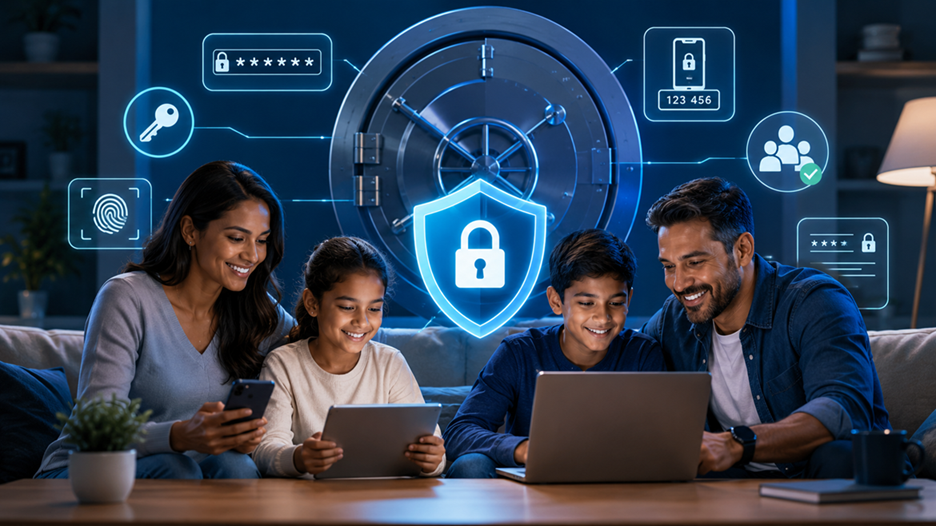
If your family has dozens of online accounts, you have probably seen the same problem more than once: someone forgets a password, another person writes it in a phone note, and eventually somebody starts using the same password everywhere. Streaming services, email accounts, school portals, shopping sites, banking, social media, cloud storage, gaming accounts, and smart-home devices can quickly turn password management into a digital junk drawer. A password manager can bring order to that mess by creating, storing, and filling strong passwords without forcing every family member to memorize them. But one question naturally comes up before handing such an important job to a free service: is a free password manager actually safe for a family?
The short answer is yes, a reputable free password manager can be safe for families, but the word “reputable” matters enormously. Free software is not automatically secure, just as paid software is not automatically secure. What matters is how the provider protects the vault, whether sensitive information is encrypted properly, how the company handles authentication, whether the software receives security updates, and what happens if something goes wrong. Current offerings show that some free password managers provide surprisingly strong fundamentals. For example, Bitwarden currently offers a free individual plan with unlimited password storage, access across devices, password generation, and encrypted synchronization, while Proton Pass Free offers unlimited logins, notes, and credit cards across unlimited devices.
For a family, however, there is another layer to consider. Security is not only about encryption. It is also about usability, sharing, recovery, device safety, and human behavior. A beautifully engineered vault does little good if a parent uses the same master password everywhere or a teenager installs a suspicious browser extension that can interfere with autofill. Think of a password manager as the family home’s digital safe. The safe needs a strong lock, but you also need to make sure everyone knows where the key belongs, who is allowed inside, and what to do if the key is lost.
What Makes a Password Manager Safe?
A trustworthy password manager should protect your credentials at several stages: when they are stored, when they are synchronized between devices, and when you unlock and use them. One of the most important concepts to understand is end-to-end or zero-knowledge encryption. In a zero-knowledge design, the provider is designed so that it cannot simply look inside your vault and read your passwords. Bitwarden, for example, describes its service as using zero-knowledge encryption and open-source security, while Proton says its family service uses end-to-end encryption so that stored credentials cannot be accessed by Proton itself.
That architecture is important because your password vault contains some of the most valuable information you own online. Imagine putting the keys to your house, car, office, bank account, and storage unit into one physical box. You would not choose that box based only on whether it was free. You would want to know how it was constructed, who could open it, and what protections existed if someone stole it. A password manager deserves the same level of scrutiny. Encryption does not make a service invincible, but it can make stolen encrypted data dramatically harder to turn into usable passwords.
Encryption and Zero-Knowledge Design
Encryption is one of the first things to investigate when comparing password managers. A reputable provider should explain its security architecture clearly rather than hiding behind vague claims such as “military-grade security.” Look for information about how your vault is encrypted, whether encryption happens locally before synchronization, and whether the company can technically access your stored credentials.
Zero-knowledge architecture is particularly attractive for families because the service provider is not supposed to have a readable copy of your master vault sitting on its servers. That does not mean the family is automatically protected from every threat. If an attacker gains control of a parent’s unlocked device, for example, encryption at rest cannot magically protect information that is already available to the user. Likewise, if somebody gives away their master password through a phishing attack, the strongest encryption system in the world cannot compensate for that mistake.
The important takeaway is that encryption is a foundation, not the entire building. Families should look for a combination of strong encryption, secure authentication, regular updates, reputable software, transparent security practices, and sensible account recovery options.
Account Security and Two-Factor Authentication
The master password deserves special attention because it can act like the front door to the family’s digital safe. It should be long, unique, and never reused on another website. A memorable passphrase made from several unrelated words can be easier to manage than a short password packed with symbols, especially when the family needs to remember it without writing it on a sticky note next to the computer.
Two-factor authentication, or 2FA, provides another important layer. When enabled, logging in requires something beyond the password, such as a time-based authentication code, security key, or another approved verification method. Bitwarden currently lists advanced two-step login among its core security features, while its paid family offering adds additional security and emergency-access capabilities.
For a family, 2FA should ideally be enabled on the password manager account itself before importing hundreds of credentials. It is also wise to secure the email account associated with the manager because email can be involved in account recovery. In practical terms, protecting the password manager means protecting the master key and the recovery path, not merely the vault.
Are Free Password Managers Actually Secure?
The idea that “free means dangerous” is too simplistic. Some free password managers are built by established security-focused companies and offer substantial security features without charging individual users. Bitwarden currently states that its core password management service is always free and includes unlimited storage for logins, notes, cards, and identities, along with access across devices. Proton Pass Free similarly advertises unlimited logins, notes, and credit cards, unlimited devices, password generation, passkey support, and alerts for weak and reused passwords.
The bigger issue is that free plans often focus on individual use rather than family administration. You might get an excellent personal vault but limited options for sharing credentials among several people. A family may therefore discover that the security technology is perfectly adequate while the collaboration features are not. That distinction matters because families often need to share things such as a streaming account, household utility login, Wi-Fi credentials, school information, or an account used by both parents.
A free individual account can still be useful if each person maintains a separate vault and the family rarely needs shared credentials. But if you want shared collections, emergency access, administrative controls, multiple premium accounts, or more sophisticated family organization, a paid family plan may provide better value. Bitwarden’s current Families plan, for example, supports up to six users and includes features such as secure sharing, collections, emergency access, and premium accounts for all six users.
Free Does Not Automatically Mean Unsafe
There is an important distinction between free software from a reputable provider and a random free password application downloaded from an unknown website. The first can be a sensible security choice. The second can introduce unnecessary risks.
Before trusting a free password manager with your family’s credentials, investigate the provider’s reputation, security documentation, update history, platform support, and authentication options. Check whether the application is distributed through official channels and whether the company clearly explains what information it collects. A password manager should not feel like a mysterious black box.
Open-source software can also provide additional transparency because its source code can be inspected by researchers and the broader technical community. That does not automatically prove that every part of an application is secure, but it can be a useful signal when combined with independent security review, a strong development history, and responsible vulnerability handling. Bitwarden, for example, currently highlights its open-source security model as part of its product offering.
Where Free Plans Usually Have Limits
The most common limitation is not necessarily weaker encryption. It is missing convenience and family-management features. Free plans may restrict the number of users, shared vaults, emergency-access tools, file attachments, integrated authentication features, or administrative controls.
This is why comparing password managers solely by the word “free” can be misleading. Suppose one service gives you excellent encryption and unlimited personal passwords but no practical way to share selected credentials with your spouse. Another service costs a few dollars a month and lets six family members maintain private vaults while securely sharing household credentials. The second option may actually reduce risk because the family no longer needs to send passwords through messaging apps or keep them in an unsecured spreadsheet.
The decision should therefore be based on security plus usability. If a free plan gives your family the tools needed to behave securely, it can be an excellent choice. If its limitations push your family toward unsafe workarounds, paying for a family plan may be the safer decision.
Why Families Need Password Managers
Families often have more credentials than they realize. One household can easily accumulate accounts for banks, insurance, electricity, mobile providers, schools, shopping websites, healthcare portals, entertainment, travel, government services, work-related tools, and dozens of smaller services. The problem gets worse when different family members use different devices and browsers.
Without a password manager, people often create shortcuts. They reuse an old password with a different number, write credentials in notebooks, store them in plain-text notes, or send them to another family member over chat. These methods are convenient because they solve the immediate problem. Unfortunately, convenience without security can become a serious weakness over time.
A password manager changes the equation by making strong password behavior easier. Instead of asking a teenager to memorize a 20-character random password for a rarely used website, the manager can generate and remember it. Instead of texting a password to another family member, a supported sharing system can provide controlled access. Instead of asking, “What was the password for that account?” someone can search the appropriate vault.
The Problem With Shared Passwords
Sharing one password across an entire family creates a difficult security problem. If the password is changed, everyone needs the new version. If one person’s device is compromised, the same credential may potentially be exposed. If someone accidentally enters the password into a phishing website, every family member using that password becomes part of the incident.
A password manager encourages a better model: unique credentials for each important account, with controlled sharing where necessary. For example, each parent can have a separate account for personal banking, while household services can be shared through an appropriate vault or collection. This separation makes it easier to know who has access and reduces unnecessary credential exposure.
The same principle applies to children. A child does not necessarily need access to a parent’s financial credentials simply because the family uses one password manager. A well-designed family setup should let parents keep sensitive credentials private while sharing only the information that a child actually needs.
Secure Sharing Across Family Members
Secure sharing is one area where paid family plans can become attractive. Bitwarden’s current family offering allows six users to share vault items through a family organization, while Proton offers a dedicated Pass Family plan for six users with private vaults and family-oriented sharing.
This approach is much better than putting every password into one giant family vault. Think of a physical house with several rooms. Everyone may have a key to the front door, but that does not mean everyone should have access to every drawer. A good password manager should preserve that idea digitally: shared access when appropriate, private access when necessary.
For families, that can mean separate private vaults for personal accounts plus a shared area for household services. The exact setup depends on the manager, but the principle is universal: do not share credentials simply because the software makes it possible.
The Main Risks of Using a Free Password Manager
No password manager is risk-free. The goal is to reduce overall risk compared with the alternatives. One major threat is account takeover. If someone obtains the credentials needed to unlock a password manager, they may gain access to a large collection of accounts. That makes the master password and authentication settings extremely important.
Another threat is the device itself. A password manager can protect an encrypted vault while it is locked, but an infected computer or phone may be able to interfere with information after you unlock it. Malicious browser extensions, malware, phishing pages, and compromised applications can create risks around autofill and credential entry. Recent academic research has continued to examine how malicious scripts and browser extensions can potentially target passwords after autofill, demonstrating why password-manager security is not simply a matter of encrypting a database.
That does not mean families should abandon password managers. It means they should understand what the tool can and cannot protect.
Weak Master Passwords and Account Takeover
The biggest mistake is often surprisingly simple: using a weak master password. A password manager cannot fix a master password that a user deliberately makes easy to guess.
Avoid names, birthdays, pet names, favorite sports teams, phone numbers, and familiar phrases. Do not reuse the password from your email account, social media, or another service. If your password manager supports passkeys or hardware security keys for account protection, investigate whether those options make sense for your family.
Parents should also think about recovery. A forgotten password can become a serious problem when the provider follows a security architecture where it cannot simply view or reset the vault for you. That inconvenience is partly the price of stronger privacy. Before migrating your family’s passwords, understand the provider’s recovery procedures and emergency-access features.
Phishing, Malware, and Unsafe Devices
A password manager does not make phishing disappear. If someone clicks a fake login page and voluntarily enters credentials, the manager may not be able to prevent every attack. Some managers provide phishing protections or domain-aware autofill behavior, but users still need to pay attention to where they are logging in.
The safest family strategy is layered protection. Keep operating systems and browsers updated. Remove unnecessary browser extensions. Install applications from trusted sources. Teach children and less technical family members not to approve unexpected login prompts. Make sure important accounts have 2FA or passkeys where available.
This is especially important because password managers concentrate credentials. Concentration is their greatest strength and one of their biggest risks. If you place all your keys in one safe, protecting that safe becomes extremely important.
What Features Should Families Look For?
The best family password manager is not necessarily the one with the longest feature list. Look for features that solve real problems in your household. At minimum, you want secure encrypted storage, strong password generation, reliable synchronization, modern authentication, reputable apps, and good support for the devices your family actually uses.
Family sharing deserves special attention. A service may advertise a “family” plan but still provide a poor experience for private and shared credentials. Ideally, every family member should have a personal vault while selected items can be shared securely. You should also be able to remove someone’s access when circumstances change.
Another useful feature is security reporting. A password manager that can identify reused, weak, or exposed credentials can help families clean up old security habits. Bitwarden’s current premium and family offerings include vault health reports and alerts for risky passwords. Proton Pass Free currently advertises alerts for weak and reused passwords as well.
Secure Sharing and Separate Vaults
Separate vaults are particularly useful when parents and children share one password manager service. A child may need access to a streaming service or school account, but there is no reason for that child to see the parents’ financial credentials. The ability to maintain private vaults while selectively sharing items creates a much cleaner security boundary.
Emergency access can also matter. Imagine one parent becomes unavailable and the other needs access to critical household accounts. Some premium family plans provide emergency-access mechanisms that allow designated contacts to request access under defined conditions. Bitwarden and Proton both currently advertise emergency-access capabilities on paid tiers.
Families should also consider platform compatibility. A technically excellent manager becomes frustrating if it does not work properly on a family member’s phone, computer, or browser. Before importing passwords, test the manager on every major device that will use it.
Password Generation, Passkeys, and Alerts
A strong password generator can make one of the most tedious security tasks almost automatic. Instead of inventing passwords yourself, let the manager create unique credentials that are long and difficult to guess. This is especially helpful for accounts that are not important enough to justify memorizing a password but still contain personal information.
Passkeys are another technology families should watch. They can reduce dependence on traditional passwords for services that support them. Current password managers such as Bitwarden and Proton Pass advertise passkey management or support as part of their platforms.
Security alerts can then help identify problems after the initial setup. A family should periodically review reused passwords, weak credentials, and exposed accounts. The goal is not to achieve a perfect vault overnight. The goal is to gradually move the household away from predictable passwords and toward unique, well-protected authentication.
Free vs. Paid Password Managers for Families
The right choice depends heavily on how many people need access and how much sharing you expect to do. A free individual plan may be enough for one parent who simply wants secure password storage across devices. But families generally have additional requirements, particularly around sharing and administration.
| Feature | Free Individual Plan | Paid Family Plan |
| Password storage | Usually available | Available |
| Strong password generator | Often available | Available |
| Multiple devices | Often available | Available |
| Private vault | Usually available | Available |
| Family sharing | Often limited | Usually extensive |
| Multiple family members | Often limited | Designed for families |
| Emergency access | May be limited | More commonly included |
| Advanced security reports | Varies | More commonly included |
| Family administration | Limited | Better controls |
| Cost | $0 | Subscription |
Current examples show that free plans can be quite capable. Bitwarden’s free individual service includes unlimited passwords and access across devices, while Proton Pass Free includes unlimited logins and unlimited devices. On the family side, Bitwarden currently lists a six-user Families plan at $3.99 per month when billed annually, while Proton offers a six-user Pass Family plan with private vaults and family-oriented features.
The key question is not “Can I avoid paying?” It is “Which setup will help my family maintain safer habits?” If a free plan meets your needs, there is no security rule saying you must upgrade. If the free plan causes you to share passwords through text messages or keep a common spreadsheet because it lacks family sharing, spending money on the right plan can be a sensible security investment.
How to Set Up a Free Password Manager Safely
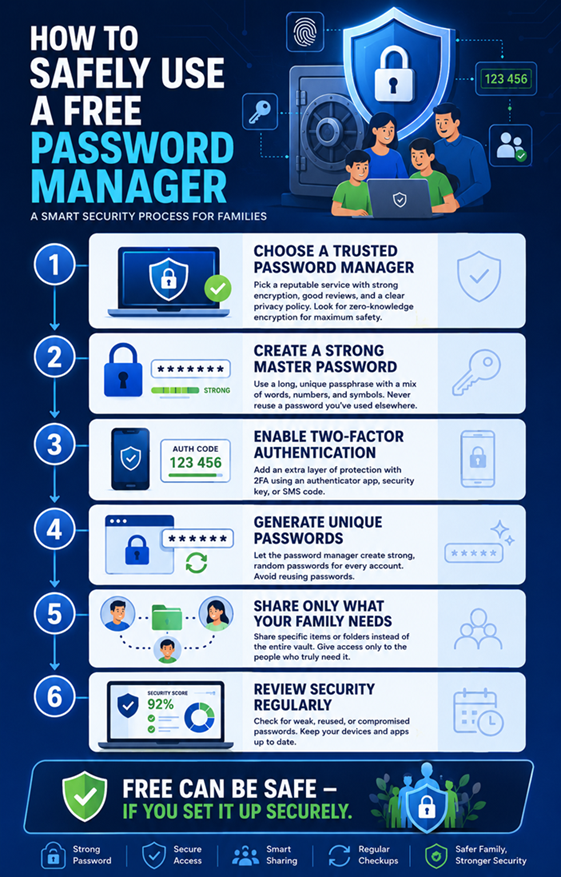
Start with the provider, not your passwords. Download the official application or browser extension from the provider’s legitimate website or an official app store. Avoid unofficial downloads, modified applications, and suspicious extensions. Before importing your entire password collection, verify that the service works correctly on the devices your family uses.
Next, create a strong and unique master password. Do not use one that has appeared anywhere else. Turn on two-factor authentication as soon as possible. Secure the email account associated with the manager as well because control over that email account may affect account recovery.
Then import your existing credentials and begin cleaning them. Replace reused passwords with unique generated passwords, starting with high-value accounts such as email, banking, shopping, cloud storage, and social media. Enable 2FA or passkeys on important services whenever they are supported.
Once the vault is organized, teach each family member the basics. Explain why the password manager exists, how to unlock it safely, and what phishing looks like. Children should understand that receiving a login request or message does not automatically mean it is legitimate. Parents should also avoid turning the password manager into a single shared account where everyone knows the same master credentials.
Finally, review the setup every few months. Remove old accounts, change compromised passwords, review shared access, and update devices. Security is not a one-time installation. It is closer to maintaining a household alarm system: it works best when the equipment and habits around it are kept current.
Best Practices for Parents and Children
Parents should establish a few simple household rules. First, never reuse important passwords. Second, never send passwords through ordinary chat unless there is an unavoidable reason and the information is not sensitive. Third, do not install random browser extensions simply because a website recommends them. Fourth, use 2FA or passkeys on important accounts.
Children do not need a lecture about cryptography. They need practical rules they can remember. “Use the password manager instead of making your own password” is more useful than explaining encryption algorithms. “Check the website before logging in” is more actionable than discussing every type of phishing attack.
For younger children, parents can manage access more closely. Older teenagers can gradually take responsibility for their own accounts while still using the family password manager. The aim should be to teach good digital habits rather than create permanent dependence on the parent who knows every password.
Parents should also avoid storing everything in one shared vault simply because it seems convenient. Personal email, banking, employment, private social media, and other sensitive accounts should generally remain private. Shared household accounts can be placed in the appropriate shared area when the password manager supports that feature.
The family should also have a plan for emergencies. What happens if one parent loses their phone? What happens if someone forgets their master password? What happens if a family member is unavailable and another person needs access to an essential account? Understanding these scenarios before they happen can prevent panic later.
Is a Free Password Manager Safe for Families?
Yes, a free password manager can be safe for families, provided you choose a reputable service and configure it correctly. The free price tag is not the main security concern. The important questions are whether the service uses strong encryption, protects the vault appropriately, supports modern authentication, receives security updates, and provides a trustworthy application experience.
For a small household, a free plan may be enough, particularly when every person can maintain their own account and the family has limited sharing needs. Current free offerings from providers such as Bitwarden and Proton demonstrate that basic password management, strong password generation, cross-device access, and other useful security features can be available without a subscription.
However, families should not confuse free personal password management with a complete family-management solution. If your household needs multiple private vaults, extensive sharing, emergency access, advanced reports, or centralized organization, a paid family plan may be more appropriate. The subscription can be worthwhile if it removes unsafe workarounds and makes secure behavior easier.
The most important point is simple: using a reputable free password manager is usually much better than reusing weak passwords, storing credentials in plain text, or sharing passwords casually through messages. The password manager becomes one part of a broader security system that also includes strong authentication, updated devices, careful browsing, phishing awareness, and sensible family sharing.
A free password manager is therefore not automatically a compromise. In the right circumstances, it can be a practical first step toward better security for the entire household.
Conclusion
A family does not need to spend a large amount of money to start managing passwords securely. A reputable free password manager can provide a strong foundation by generating unique credentials, encrypting sensitive information, synchronizing passwords across devices, and reducing the temptation to reuse the same password everywhere. Current free offerings from Bitwarden and Proton show that substantial password-management functionality is available without a subscription.
The real challenge is implementation. Choose a trustworthy provider, create a strong master password, enable 2FA, keep devices updated, and teach every family member how to recognize suspicious login requests. Use private vaults for personal accounts and secure sharing for genuine household needs.
If the free plan gives your family everything it needs, there is no reason to pay simply for the sake of paying. But if the limitations encourage unsafe password sharing or make family management difficult, a paid family plan can be a worthwhile upgrade. The safest password manager is ultimately the one your family can use correctly and consistently.
FAQs
1. Is it safe to store all family passwords in one password manager?
Yes, provided the password manager is reputable and uses strong encryption. Keeping credentials in a properly secured vault can be safer than storing passwords in notes, spreadsheets, or messages. The important part is protecting the master account with a strong unique password and additional authentication.
2. Can a free password manager be hacked?
Any online service can potentially face attacks, so no password manager should be described as completely risk-free. A well-designed manager uses encryption and other protections to reduce the impact of attacks. Your own account security also matters because an attacker who gains control of your unlocked account may be able to access the credentials you have stored.
3. Should parents share one password manager account with their children?
Generally, no. It is better for each family member to have their own account or private vault when the service supports family management. Shared household credentials can then be shared selectively rather than exposing every password to everyone.
4. Is a paid family password manager safer than a free one?
Not automatically. A paid plan may offer additional security and family-management features, but price alone does not determine security. A reputable free service with strong encryption and good account protection can be safer than a poorly designed paid service.
5. What is the most important password-manager feature for a family?
There is no single feature that matters in every household, but strong encryption, secure authentication, reliable sharing, and separate private vaults are among the most important. Families should also look for password generation, passkey support, security alerts, good device compatibility, and sensible account-recovery options.
