






What Are AI Coding Assistants?
AI coding assistants have changed the way software developers write, debug, understand, and maintain code. Instead of treating programming as a process where every line has to be typed manually, these tools act more like an intelligent pair programmer sitting beside you. You can describe what you want in natural language, ask why a function is failing, request a refactor, generate a test, or ask the assistant to explain an unfamiliar part of a co debase. The technology behind these tools is based on large language models that have been trained to understand programming languages, natural-language instructions, and common software-development patterns. However, not every AI coding assistant works in exactly the same way. Some are commercial products built around a managed cloud service, while others are open-source tools that let developers choose their own AI model, provider, workflow, and level of control.
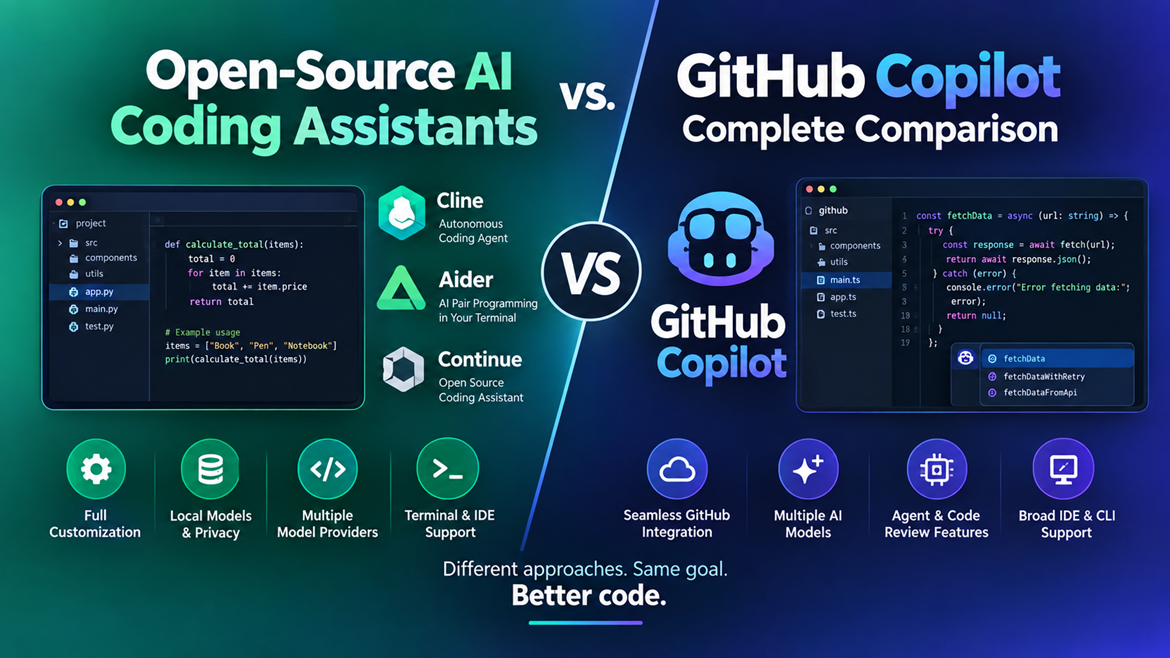
The biggest distinction in today’s market is therefore not simply AI assistant versus AI assistant. It is increasingly managed AI development platform versus customization open-source coding agent. GitHub Copilot represents the managed-platform approach, combining AI models with GitHub’s development ecosystem, IDE integration, agent capabilities, code review features, and cloud services. Open-source alternatives take a different path. Projects such as Cline and Aider give developers considerably more control over the models and infrastructure they use, while allowing them to build workflows around their own preferences. Cline describes itself as an open-source coding agent available across IDE, terminal, and desktop environments, while Aider focuses heavily on AI pair programming from the terminal.
How AI Coding Assistants Work
At a basic level, an AI coding assistant receives context about your request and generates a response using an underlying language model. That context might include the code surrounding your cursor, selected files, project structure, terminal output, documentation, error messages, or instructions that you provide in a chat window. More advanced coding agents can go beyond generating text. They can inspect multiple files, propose changes, execute commands, run tests, analyze errors, and continue working until a particular task is completed.
This difference matters because a simple auto complete tool and an autonomous coding agent are not really the same product. Auto complete is useful when you already know what you want to type. An agent is more useful when you know what you want the software to accomplish, but you do not necessarily want to manually implement every intermediate step. Modern GitHub Copilot includes agent-oriented functionality, while open-source projects such as Cline are explicitly designed around agents that can inspect projects, edit files, execute commands, and react to the resulting output.
Why Developers Use Them
The appeal is straightforward: programming contains a huge amount of repetitive work. Writing boilerplate, creating unit tests, converting one pattern into another, documenting functions, investigating compiler errors, and searching for the right syntax can consume hours without necessarily requiring deep creative thinking. An AI assistant can reduce the time spent on these tasks.
However, speed should not be confused with correctness. AI-generated code can contain subtle bugs, insecure assumptions, incorrect APIs, or logic that technically runs but does not satisfy the actual requirements. The strongest developers therefore treat AI as an accelerator rather than an unquestionable authority. The ideal workflow is closer to developer plus AI than AI instead of developer.
What Is GitHub Copilot?
GitHub Copilot is Microsoft’s/GitHub’s AI-powered development assistant designed to integrate directly into the software-development workflow. Its major advantage is not simply that it can generate code. Its real strength is the ecosystem surrounding that generation: GitHub repositories, pull requests, code review, IDE integration, CLI workflows, agent features, and access to multiple AI models.
That ecosystem can make Copilot particularly attractive to developers who already use GitHub heavily. Rather than assembling an AI model, editor extension, terminal agent, Git provider, and authentication workflow yourself, Copilot attempts to bring many of those pieces together under one product. GitHub’s current plans also include a free tier, paid individual plans, and higher-priced options aimed at developers who need more extensive agent and premium-model usage.
Copilot Features in 2026
Copilot has moved well beyond the original idea of inline code completion. Current offerings include code completion, chat, agent functionality, code review, CLI support, cloud-based agent workflows, and access to multiple models. GitHub’s current documentation lists models from providers including OpenAI, Anthropic, Google, Microsoft, Moonshot AI, and xAI, with availability depending on the Copilot plan and environment.
That multi-model approach is one of Copilot’s biggest strengths. Developers do not necessarily have to commit to a single underlying AI model for every task. A fast model may be appropriate for simple code completion, while a stronger reasoning model can be more useful for a difficult debugging or architecture task. GitHub’s model availability can change over time, so developers should always check the current model list before making a purchasing decision.
Copilot Pricing and Plans
One of the most important changes in the current Copilot landscape is that the service is no longer simply a single low-cost subscription. GitHub currently lists Free, Pro, Pro, and Max individual plans. The Free plan is listed at $0 and includes a monthly allowance of code completions, while Pro is listed at $10 per user per month, Pro at $39, and Max at $100. The paid plans provide progressively greater access to agent features, premium models, and usage credits.
| Plan | Current listed price | Best suited for |
| Free | $0/month | Beginners and occasional coding |
| Pro | $10/month | Everyday development |
| Pro+ | $39/month | Heavy development and premium models |
| Max | $100/month | High-volume agent workflows |
Pricing and included usage can change, particularly as AI models and agent workloads become more expensive to operate. Therefore, the price alone should not determine the winner in this comparison. A developer should also consider the value of integrated tooling, model access, productivity gains, privacy requirements, and the amount of configuration they are willing to manage.
What Are Open-Source AI Coding Assistants?
Open-source AI coding assistants take a fundamentally different approach. Instead of forcing developers into one managed platform, they typically provide software that can be inspected, modified, configured, and connected to different AI models. Depending on the project, you may be able to use commercial cloud models, open models, local models, or a combination of providers.
This flexibility is particularly attractive to experienced developers. Imagine buying a kitchen where every appliance is permanently attached and controlled by one manufacturer. It may work beautifully, but you have limited freedom to replace individual components. An open-source coding environment is more like having a modular kitchen: you decide which model, provider, editor, terminal, tools, and workflow you want to connect. The trade-off is that you may also become responsible for configuring and maintaining those components.
Popular Open-Source Options
The open-source coding-agent ecosystem changes rapidly, but Cline and Aider are two useful examples. Cline is designed as an autonomous coding agent with IDE, terminal, desktop, and SDK experiences. Its documentation describes capabilities including editing code across a project, executing terminal commands, running tests, working with errors, and allowing users to review changes.
Aider takes a more terminal-eccentric approach. Its project describes itself as AI pair programming in your terminal and supports both cloud and local LLMs. It can map a co debase, integrate with Git, work across many programming languages, and automatically lint or test changes.
Continue is another historically important open-source coding assistant, although its current repository states that the project reached a final 2.0.0 release and is no longer actively maintained. That is itself an important lesson when choosing open-source software: popularity and GitHub stars are not enough. Developers should examine recent commits, releases, issue activity, documentation, security practices, and project governance before building a critical workflow around any open-source tool.
Local AI Models and Privacy
One of the most attractive reasons to explore open-source coding assistants is the possibility of using local AI models. Instead of sending every request to a third-party cloud service, developers can sometimes run an AI model on their own computer or private infrastructure. This can be valuable for organizations working with proprietary source code, internal documentation, or projects with strict data-control requirements.
Local AI is not automatically better, though. Running powerful models locally requires appropriate hardware, storage, memory, and technical knowledge. Smaller models may also produce weaker results than the strongest cloud models. The practical question is therefore not simply, “Can I run AI locally?” but rather, “Can I run a model locally that is good enough for my workload at an acceptable cost and speed?”
GitHub Copilot vs. Open-Source Tools: Key Differences

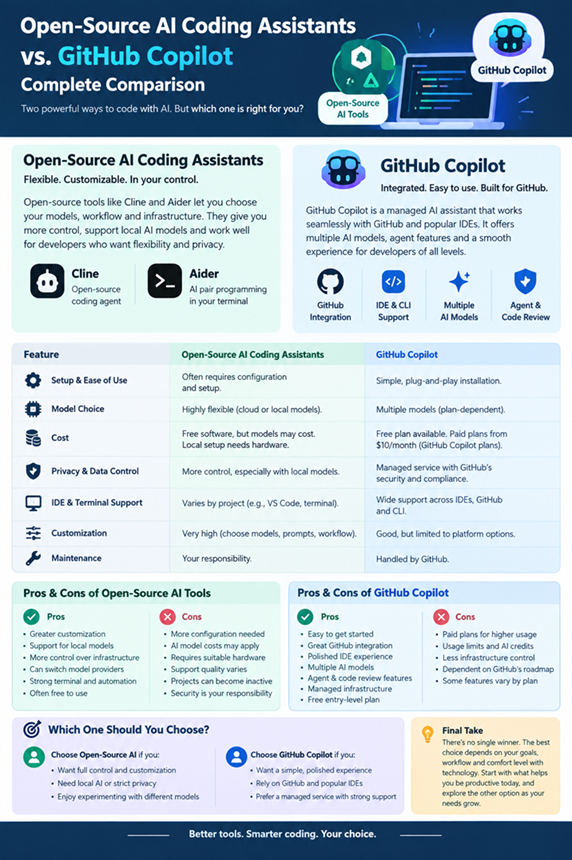
The most useful way to compare these approaches is to stop asking which one is universally better. Instead, consider control, convenience, cost, models, privacy, integration, and technical requirements.
| Category | GitHub Copilot | Open-Source AI Assistants |
| Setup | Usually simple | Often requires configuration |
| Model choice | Broad, plan-dependent | Often highly flexible |
| Local models | Limited/depends on workflow | Stronger potential |
| GitHub integration | Excellent | Varies |
| IDE support | Broad | Depends on project |
| Terminal workflows | Available | Often strong |
| Customization | Good | Usually much higher |
| Privacy control | Managed service policies | Potentially greater control |
| Maintenance | Mostly handled for you | Often your responsibility |
| Cost | Subscription/usage model | Software may be free, models may cost money |
| Best for | Convenience and integrated workflows | Flexibility and control |
Features and Developer Experience
Copilot’s biggest advantage is convenience. Installation is generally straightforward, the interface is polished, and the tool is designed to fit naturally into common development environments. GitHub also controls much of the infrastructure behind the service, which means developers do not have to spend their time deciding which model endpoint to connect, how to authenticate different providers, or how to maintain an agent framework.
Open-source tools can provide a richer experience for developers who enjoy customization. You might choose a particular model for coding, another model for reasoning, and a local model for sensitive tasks. You can also customize prompts, permissions, commands, context strategies, and workflows depending on the tool.
The trade-off is obvious: freedom creates responsibility. If something breaks, there may not be a single company responsible for fixing your entire stack.
Model Choice and Flexibility
Model flexibility has become one of the most important differences between commercial and open-source coding tools. GitHub Copilot currently supports a broad selection of models from multiple AI providers, although exactly which models are available depends on the plan and where Copilot is being used.
Open-source assistants can be even more flexible because they often act as a layer between the developer and the model provider. Aider, for example, documents support for both cloud and local LLMs.
For developers who enjoy experimenting with new models, this can be a major advantage. You are not necessarily tied to one company’s model road map. On the other hand, model flexibility can create decision fatigue. If you simply want to open VS Code and start coding, having dozens of configuration choices may feel more like work than freedom.
Cost and Usage
Cost is more complicated than “open source is free.” The software itself may be free, but the AI model powering it may not be. If you connect an open-source assistant to a commercial API, you may pay based on tokens or usage. If you run a local model, you pay indirectly through hardware, electricity, storage, and maintenance.
Copilot provides a much more predictable managed-service experience for many users. GitHub currently offers a free plan with limited usage and paid individual plans beginning at $10 per month.
For a beginner, Copilot Free or Pro can therefore be simpler than assembling a custom open-source stack. For a developer who already owns suitable hardware and wants to run local models extensively, the calculation can be very different.
Privacy and Data Control
Privacy is one of the strongest arguments for evaluating open-source tools. If you can run both the assistant and model locally, you may have considerably more control over where source code and prompts are processed. That can be valuable in environments involving confidential software, customer information, internal business logic, or regulated data.
However, simply installing an open-source assistant does not guarantee privacy. If that assistant sends requests to a cloud model provider, your data still leaves your machine. You need to examine the complete architecture: the editor extension, AI provider, API endpoint, logging behavior, telemetry, proxy services, and any external tools the agent can access.
Copilot also provides organizational controls and enterprise-oriented features, but businesses should still evaluate the applicable GitHub terms, data policies, administrative controls, and compliance requirements before deploying it with sensitive repositories.
IDE and Terminal Support
GitHub Copilot is particularly attractive if you want a polished Die-eccentric experience. It is designed around popular development environments and also includes CLI functionality. Current Copilot plans list support across editors and IDEs as well as GitHub itself and the CLI.
Open-source tools can be more varied. Cline, for example, supports VS Code and other environments while also providing a CLI and desktop application. Aider is especially appealing if your workflow already revolves around the terminal and Git.
This creates an interesting divide. Copilot often feels like an AI layer added to an existing mainstream developer ecosystem. Open-source agents can feel more like programmable development tools that happen to use AI.
Which Option Is Better for Different Developers?
There is no universal winner. Your experience level, project size, privacy requirements, budget, preferred editor, and willingness to configure technical tools all change the answer.
Best Choice for Beginners
For beginners, GitHub Copilot is usually the easier starting point. A new developer already has enough concepts to learn: programming syntax, Git, debugging, package managers, frameworks, testing, and deployment. Adding model providers, API keys, local inference, context windows, agent permissions, and configuration files can create unnecessary complexity.
Copilot can help beginners understand code while they are learning. A useful workflow is to ask it to explain a function, generate a simple example, suggest a test, or identify why an error occurs. The important part is to read the explanation and verify the output rather than blindly accepting generated code.
Once a beginner becomes more comfortable with Git, terminals, models, APIs, and development environments, experimenting with open-source coding assistants becomes much more interesting.
Best Choice for Professional Developers
Professional developers should make the decision based on workflow rather than novelty. If your organization already relies heavily on GitHub, pull requests, repositories, and standard IDEs, Copilot can provide substantial convenience. Its current feature set includes agent workflows, code review, CLI support, and access to multiple AI models.
An experienced developer who wants deep customization may prefer an open-source agent. This is especially true when the team wants to experiment with different models, maintain a custom workflow, use local inference, or integrate AI into terminal and automation pipelines.
For some teams, the best solution may even be both. Use Copilot for fast everyday coding and GitHub-centric workflows, while maintaining an open-source agent for specialized tasks or experiments.
Pros and Cons of Open-Source AI Coding Assistants
The strongest advantage is control. Developers can potentially choose the model, provider, prompts, infrastructure, integration, and workflow. That makes open-source tools appealing to technical users who do not want their development environment locked into one platform.
Another advantage is experimentation. Open-source projects often evolve through communities that are willing to test unconventional workflows. Aider, for example, supports local and cloud models, co debase mapping, Git integration, testing, and multiple programming languages.
The disadvantages are equally important. Setup can be harder, documentation can vary, and projects can change direction unexpectedly. An open-source repository can become inactive, as demonstrated by Continues current repository status.
Pros:
- Greater customization
- Potential support for local models
- More control over infrastructure
- Ability to change model providers
- Strong terminal and automation possibilities
- Often free to install
Cons:
- More configuration
- AI model costs may still apply
- Hardware may be required for local inference
- Support quality varies
- Projects can become inactive
- Security is partly your responsibility
Pros and Cons of GitHub Copilot
Copilot’s biggest advantage is its polished, integrated experience. Instead of constructing an AI coding environment from separate components, developers receive a managed service designed around common software-development workflows. GitHub’s current product includes multiple plans, agent functionality, code review, CLI access, model selection, and integration across supported development environments.
Another major strength is model variety. GitHub currently documents models from several major AI providers, meaning users can benefit from a broader selection than the original Copilot experience offered.
The disadvantages are mostly related to control, cost, and platform dependency. You are using a commercial service with plan-based usage and model availability. Some developers may prefer not to depend on a single vendor for their coding workflow.
Pros:
- Easy to get started
- Excellent GitHub integration
- Strong IDE experience
- Multiple AI models
- Agent and code-review features
- Managed infrastructure
- Free entry-level plan
Cons:
- Paid plans for heavier usage
- Usage limits and AI credits matter
- Less infrastructure control than a fully local setup
- Dependent on GitHub’s product direction
- Some advanced features vary by plan
Final Verdict
So, which should you choose in the battle between open-source AI coding assistants vs. GitHub Copilot?
For most beginners and developers who want a convenient, polished experience, GitHub Copilot is the easier recommendation. Its integration with GitHub, IDEs, CLI workflows, code review, agents, and multiple AI models makes it a powerful all-around development assistant. The current Free plan also lowers the barrier for people who simply want to test AI-assisted programming before paying for a subscription.
For experienced developers who value flexibility, local AI, experimentation, and infrastructure control, open-source coding assistants deserve serious consideration. Cline and Aider demonstrate how different the experience can become when an AI coding tool is treated as a customization development environment rather than simply a subscription product.
The smartest answer for many developers is not choosing one forever. Start with the tool that makes you productive today, learn how AI-assisted development actually works, and then experiment with alternatives. Think of Copilot as a well-equipped car that is ready to drive, while an open-source coding assistant is closer to a customization vehicle that you can modify to your exact needs. One prioritizes convenience; the other prioritizes control.
Ultimately, the best AI coding assistant is the one that helps you ship better software, not merely generate more code. AI can make development dramatically faster, but your judgment remains the steering wheel.
Frequently Asked Questions
1. Is GitHub Copilot better than open-source AI coding assistants?
Not for everyone. Copilot is generally stronger for convenience, GitHub integration, polished IDE workflows, and managed AI features. Open-source assistants can be better when customization, local models, model choice, and infrastructure control are priorities.
2. Are open-source AI coding assistants free?
The software may be free and open source, but the AI model may not be. Cloud APIs can charge according to usage, while local models require suitable hardware. Therefore, “open source” does not automatically mean zero total cost.
3. Can open-source AI coding assistants work with local AI models?
Yes, depending on the assistant and model. Aider explicitly supports connecting to local LLMs as well as cloud models. Local inference can provide greater data control, although performance depends heavily on your hardware and the model you choose.
4. Is GitHub Copilot good for beginner programmers?
Yes. Copilot can help beginners generate examples, understand unfamiliar code, troubleshoot errors, and learn programming concepts. Beginners should still verify generated code and learn the underlying concepts instead of relying on AI as an automatic answer machine.
5. Should professional developers use Copilot or an open-source coding agent?
It depends on the development environment. Teams that rely heavily on GitHub and want a managed workflow may prefer Copilot, while teams needing maximum customization or local AI may prefer an open-source agent. Some professional developers may benefit from using both for different tasks.
Conclusion
The comparison between open-source AI coding assistants and GitHub Copilot is ultimately a comparison between two philosophies of software development. Copilot emphasizes convenience, integration, managed infrastructure, and a growing collection of AI-powered development features. Open-source tools emphasize choice, experimentation, customization, and the possibility of controlling more of the AI stack yourself.
Neither approach is automatically superior. If your priority is getting productive quickly, Copilot is an excellent starting point. If your priority is controlling the tools underneath your workflow, experimenting with different models, or running AI locally, open-source assistants can be remarkably powerful.
The AI coding market will continue to change quickly, so today’s winner may not be tomorrow’s winner. The most valuable skill is therefore not learning one particular AI assistant. It is learning how to evaluate AI-generated code, choose the right model for the task, protect sensitive information, test changes, and keep yourself in control of the development process.


