

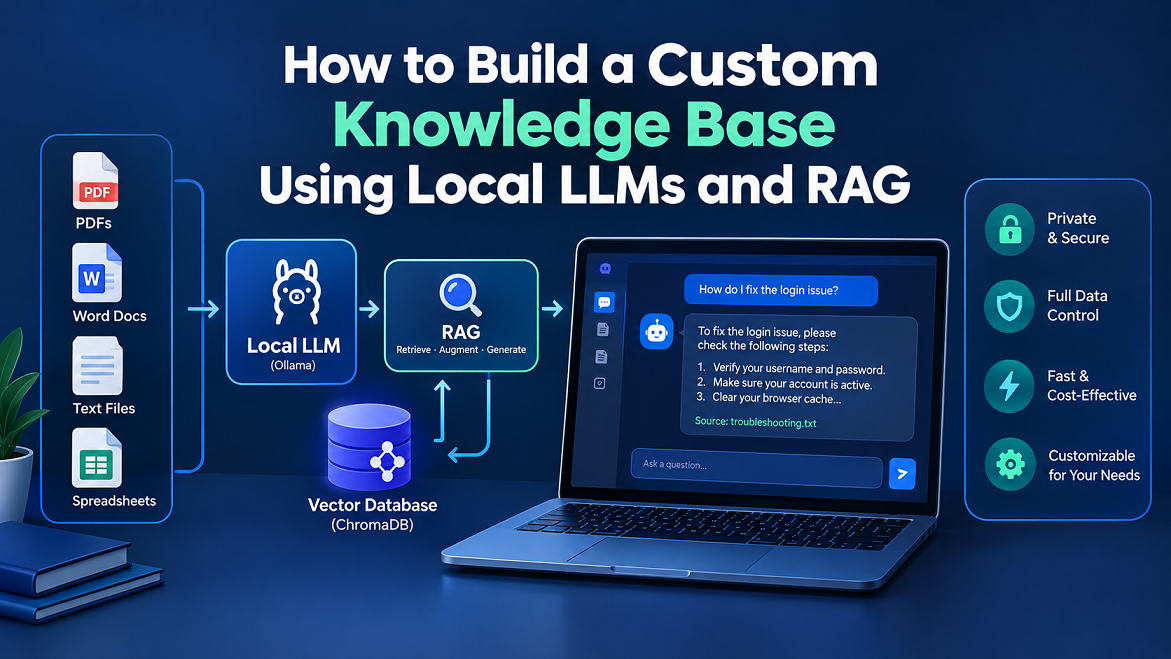
What Is a Custom AI Knowledge Base?
Imagine having hundreds of documents, research papers, business records, technical guides, and personal notes on your computer. You know the answer to a particular question is somewhere in those files, but finding it could take half an hour. A custom AI knowledge base solves this problem by letting you ask questions in everyday language and receive answers based on your own information.
Unlike a traditional search engine, which primarily finds documents containing matching words, an AI knowledge base can retrieve passages related to the meaning of your question. For example, you could ask, “Why does my website keep losing visitors?” and retrieve relevant information from your SEO reports, analytics notes, and website documentation. A language model then uses those passages to formulate an understandable answer.
The most useful part is that you can build this system around your specific needs. A student might create a searchable library of study materials, a business owner might organize company policies, and a developer might build a private assistant for technical documentation. With the right setup, your knowledge base can run on your own computer rather than depending on a cloud-based AI service.
Understanding Local LLMs and RAG
A large language model (LLM) is an AI system that understands and generates text. A local LLM runs on hardware you control, using software such as Ollama to download and manage supported models.
However, a language model does not automatically know the contents of your personal files. This is where retrieval-augmented generation (RAG) becomes useful. RAG connects a language model to an external collection of information, retrieves relevant content when a question arrives, and supplies that content to the model before it generates an answer.
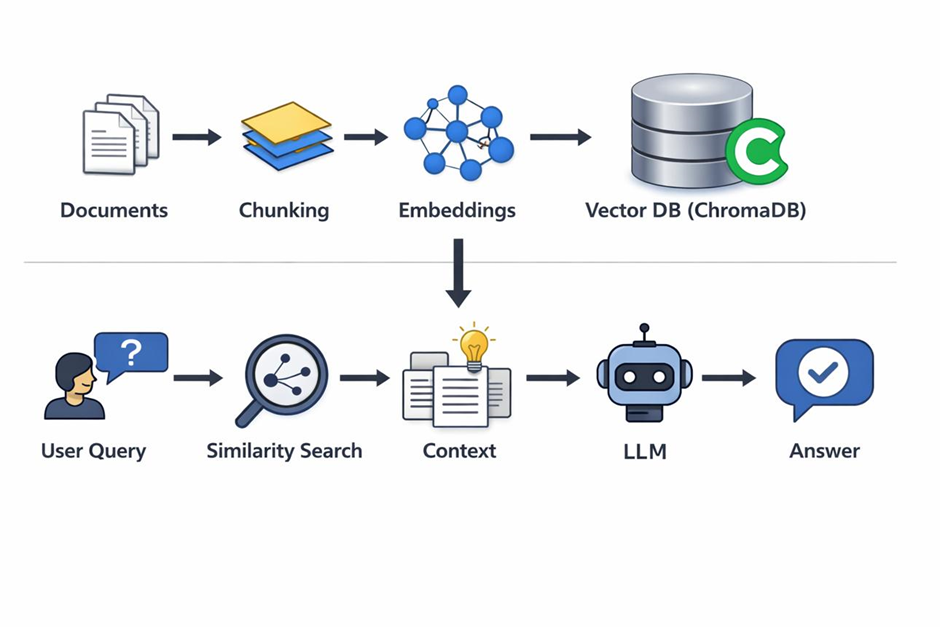
A typical RAG workflow has three main stages:
- Retrieval: Find the document passages most relevant to the user’s question.
- Augmentation: Add those passages to the prompt as supporting context.
- Generation: Ask the local LLM to produce an answer based on that context.
Think of RAG as giving an AI assistant an organized reference library. The LLM provides the language and reasoning capabilities, while the knowledge base provides the specific information needed for the task.
Importantly, RAG does not require you to retrain the model every time you add a new document. You can update the document index and retrieve the new information when needed. That makes it a practical approach for building searchable, regularly updated knowledge systems.
Why Build a Knowledge Base With Local AI?
One major reason to use local LLMs is data control. If you work with private notes, business documents, proprietary research, or internal procedures, you may not want to send the contents to a third-party AI service. A properly configured local system can process documents, create embedding, retrieve passages, and generate answers on your own hardware.
Cost is another advantage. Many local AI tools are free to use, and you generally do not need to pay an API fee for each question when inference runs locally. You will still need suitable hardware, electricity, storage, and time to maintain the system, but you can avoid usage-based cloud inference charges.
Local knowledge bases also offer flexibility. You can choose your language model, experiment with different embedding models, organize documents into separate collections, and customize how answers are generated. For example, a small business could create one knowledge base for customer support and another for internal operating procedures.
There are limitations, too. Large models can require substantial memory, and CPU-only systems may respond slowly. Local models can also produce incorrect answers, misunderstand retrieved passages, or miss relevant information. Privacy depends on the entire configuration, not simply on choosing a local model.
For these reasons, a local RAG system is particularly useful when you value control, customization, and private document search more than effortless cloud deployment.
Tools and Hardware You Need
Before building your knowledge base, choose tools that work well together. You do not need to develop a large AI application from scratch. A simple setup can use a local LLM runtime, an embedding model, a vector database, and a small Python application to connect everything.
Your computer’s hardware matters because both language models and embedding models consume memory and processing power. A smaller model can be a sensible starting point for a laptop, while a larger model may require more RAM or GPU memory. The exact requirements depend on the model’s size, quantization, context length, and the number of documents you process.
Choosing Your Local AI Technology Stack
Here is a practical overview of the main components.
| Tool | Main purpose | Best suited for |
| Ollama | Runs local language and embedding models | Beginners and developers |
| ChromaDB | Stores vectors and retrieves similar document passages | Small and medium-sized RAG projects |
| LangChain | Connects document loading, splitting, retrieval, and generation | Developers building custom workflows |
| AnythingLLM | Provides a graphical interface for chatting with documents | Users who prefer less coding |
| LanceDB | Stores and searches vector data | Projects needing a local vector database |
These tools serve different purposes rather than being direct substitutes for one another. For a code-based tutorial, Ollama, ChromaDB, and LangChain make a useful combination. If you would rather upload documents through a graphical interface, AnythingLLM may be a simpler starting point. Its documentation describes local model options, document workspace, and connections to separately installed Ollama instances.
For hardware, start with these approximate planning guidelines rather than treating them as strict requirements.
| Hardware | Practical starting point |
| 8 GB RAM | Small quantized models and limited workloads |
| 16 GB RAM | A more comfortable starting point for many small-to-medium local models |
| 32 GB RAM or more | More flexibility for larger models and multitasking |
| SSD storage | Recommended for model files and document indexes |
| Dedicated GPU | Optional, but can accelerate supported workloads |
Your results will depend on the particular model and system configuration. A computer with 16 GB of RAM, for example, does not guarantee that every model advertised as a 16 GB workload will run comfortably alongside your operating system and other applications.
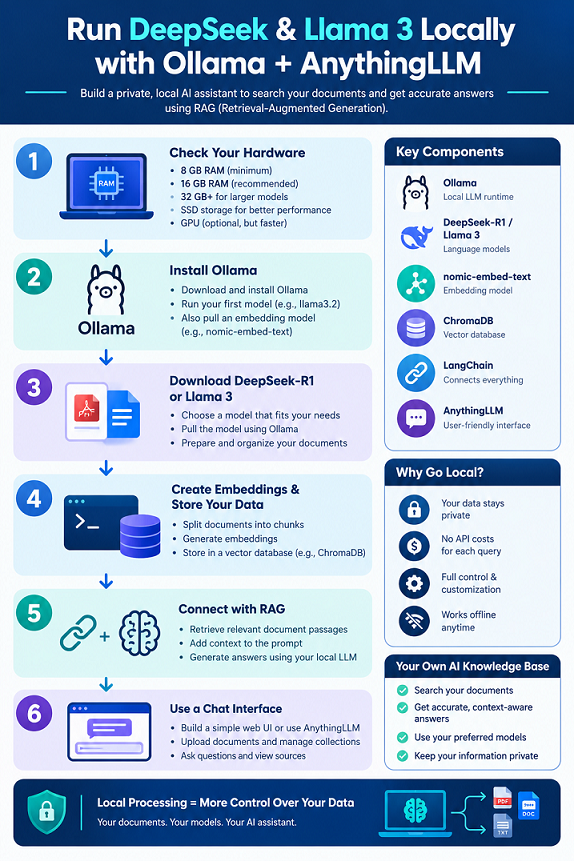
Step 1 — Install Ollama and Download a Local LLM
The first practical step is to set up Ollama. It simplifies downloading, managing, and running compatible language models without requiring you to build your own inference server.
You can then type a simple question and see whether the model responds. Press Ctrl+D or use the exit command appropriate to your terminal when you want to leave the interactive session.
The exact model you choose is important. Smaller models may be faster and use less memory, while larger models can sometimes produce stronger answers at the cost of higher resource requirements. Check each model’s current availability, license, capabilities, and hardware requirements before selecting it.
Install an Embedding Model
Your knowledge base needs another type of model: an embedding model. Unlike a chat model, an embedding model converts text into numerical vectors that can be compared to find semantically similar content.
You now have two distinct components: a model that generates answers and a model that helps find relevant passages. Keep this distinction in mind throughout the project.
If you want a ready-made application rather than a custom Python pipeline, you can explore the official AnythingLLM documentation
Step 2 — Prepare Your Documents
A knowledge base is only as useful as the information it can retrieve. Before indexing anything, collect the documents you actually want to search and organize them into a dedicated folder.
For a first project, plain-text files and Markdown documents are ideal because they are easy to read, process, and troubleshoot. You can later expand to PDFs, Word documents, HTML pages, or other formats using suitable document loaders and text extraction tools.
Create a project directory with this structure:
The data folder contains the original documents, knowledge_base.py will contain the application code, and chroma_db will store the searchable vector index. You can use different filenames to represent the kinds of information you want your AI assistant to understand.
For example, a website owner could store SEO guidelines, article briefs, internal linking plans, and technical troubleshooting notes. When asked a question about an indexing problem, the assistant can search across those files rather than relying entirely on its general training.
Document quality is just as important as document quantity. Remove outdated copies, fix corrupted text, and make sure extracted content is readable. If two documents contradict each other, preserve relevant dates and version details so the system can distinguish an old policy from a newer one.
You should also decide which files the assistant is allowed to access. Avoid indexing unnecessary personal information, passwords, authentication tokens, or confidential records that do not belong in the project. A private local application still needs sensible data-handling practices.
Step 3 — Create Embed dings and Store Your Data
Once the documents are ready, you need to turn their text into searchable vectors. This stage is commonly called document ingestion.
Start by installing Python if it is not already available, then create a virtual environment inside your project directory.
These packages provide integrations for Ollama, ChromaDB, and document splitting. Package APIs can change over time, so check the relevant documentation if a newer release uses different imports or configuration options.
This example loads .txt files, splits their contents into smaller passages, generates embedding, and stores the passages alongside their vectors in a persistent Chroma database. Each passage retains its source filename, which helps you identify where retrieved information originated. Make sure Ollama is running and that the embedding model has been downloaded before executing the script.
Why Document Chunking Matters
You might wonder why the code splits documents instead of embedding each complete file. The reason is that a long document may contain many unrelated topics. Searching the whole document as a single unit can make it difficult to retrieve the exact passage needed for a question.
Chunking breaks documents into smaller sections. The example uses 1,000-character chunks with 150 characters of overlap, which is a reasonable initial experiment for ordinary text. These values are not universal: technical documentation, tables, source code, and long-form research may require different chunk sizes.
Overlap helps preserve context at boundaries. Without it, a sentence or important explanation might be split between two chunks, leaving each passage less useful when retrieved independently. However, too much overlap can create redundant results and increase storage requirements.
After indexing, your documents are searchable by meaning rather than only by exact wording. This is the foundation of the retrieval stage.
Step 4 — Build the RAG Retrieval Pipeline
Your vector database now contains searchable document passages. The next step is to retrieve the passages that best match a user’s question and pass them to the local language model.
This is where the separate parts of RAG come together. When someone asks, “What should I check if my website pages are missing from Google?”, the system converts the question into an embedding, searches the vector database for related passages, and selects the most relevant results. Those passages become the context for the language model’s response.
Type a question related to your indexed documents. The program will return up to four passages selected through similarity search, along with their source filenames.
The k=4 setting controls how many passages the search returns. Increasing it can provide additional context, but it may also introduce irrelevant information. If you set it too low, the answer may lack an important detail. Experiment with different values using questions whose answers you already know.
One important detail is that the embedding model used for searching should match the model used to index the documents. If you change embedding models, rebuild or migrate the index appropriately rather than mixing incompatible vector representations.
Step 5 — Generate Answers From Your Documents
Retrieving relevant passages is useful, but most people want a direct answer rather than a list of document excerpts. The next step is to send the retrieved passages to a local LLM and ask it to generate a grounded response.
Install the current Ollama integration if you have not already done so. Then extend your query script with a chat model and a prompt that explains how the assistant should behave.
Save this code as ask_knowledge_base.py and run it after creating your index. Make sure the model name matches a model you have installed in Ollama.
The program retrieves relevant passages, places them in a prompt, and asks the local LLM to answer using those passages. Setting the temperature to zero encourages more consistent responses, although it does not guarantee factual accuracy.
The example also prints source filenames. This is a useful first step toward traceability, but a production application should preserve page numbers, section headings, or other precise source references whenever possible. A filename alone does not prove that a particular sentence is supported by the original document.
Remember: RAG can reduce unsupported answers, but it cannot eliminate them. The retrieval results may be incomplete, and the model may still misinterpret the evidence. Test the system against known answers before trusting it for important decisions.
Step 6 — Add a User-Friendly Chat Interface
A terminal-based knowledge base is excellent for learning, but it may not be convenient for everyday use. You might prefer a chat window where you can ask questions, review answers, and select different collections of documents.
There are two practical ways to improve the experience. The first is to build a small web interface around your Python application. The second is to use an existing application that already supports document ingestion and local model connections.
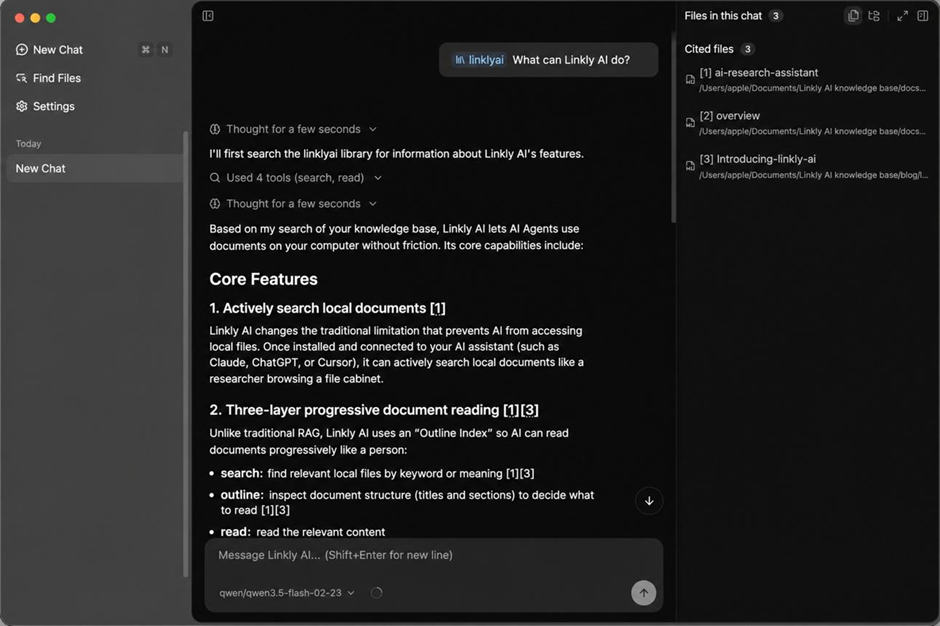
If you want a graphical interface without building every component yourself, explore AnythingLLM. Its documentation explains how to configure model providers and organize documents into workspace. Depending on your chosen version and setup, you can connect it to a local model provider and ask questions about your imported files.
Start with the official AnythingLLM documentation and follow the instructions for your operating system. If you use Ollama separately, configure the correct local connection address and select the model and embedding provider supported by your installation.
For a custom application, consider these interface features:
- A question input box with a clear submit button.
- A response area that distinguishes answers from source references.
- A document upload section with file type and size limits.
- A collection selector for switching between projects.
- A visible warning when the system cannot find sufficient supporting information.
You can also add conversation history, document filters, and a feedback button. These improvements make the system easier to use without changing the underlying RAG architecture.
Be careful when moving from a personal application to a shared service. A web interface does not automatically enforce user permissions. If different people have access to different documents, the retrieval layer must enforce those restrictions before it supplies any passages to the model.
Step 7 — Test and Improve Answer Quality
Your knowledge base is not finished simply because it returns an answer. The real test is whether it retrieves the right information and communicates it accurately.
Begin with ten to twenty questions for which you already know the answers. Include straightforward questions, questions that use different wording from the documents, questions that require combining information, and questions whose answers are not present in the knowledge base.
For example, if your documents contain a troubleshooting procedure titled “Recovering Website Access,” ask, “What should I do if I can no longer log in?” This tests whether semantic retrieval can connect the user’s wording to the relevant document.
Next, inspect the retrieved passages rather than judging only the final answer. If the system returns unrelated content, the problem may lie in document extraction, chunk size, embedding quality, or retrieval settings. If the passages are relevant but the answer is wrong, examine the prompt, model behavior, and amount of context supplied.
A useful testing table looks like this:
| Test | What to check | Possible improvement |
| Direct question | Does it find the correct passage? | Improve document quality |
| Paraphrased question | Does it recognize similar meaning? | Test another embedding model |
| Multi-part question | Does it retrieve all required evidence? | Increase or refine retrieval |
| Unknown answer | Does it admit the limitation? | Improve the prompt and retrieval threshold |
| Conflicting documents | Does it recognize different versions? | Add dates and version metadata |
| Source verification | Does the cited source support the claim? | Preserve precise source references |
You can also experiment with hybrid search, which combines semantic similarity with keyword matching. This can be useful when questions contain product names, error codes, version numbers, or technical terms that need exact matching.
For larger projects, consider re ranking. A re ranker evaluates an initial set of retrieved passages and reorders them according to their relevance to the question. It adds another component to maintain, but it can improve the quality of the context sent to the LLM.
Keep a record of failed questions and use them to guide improvements. Changing five settings at once makes it difficult to identify which change helped. Test one adjustment at a time, compare results, and retain changes that demonstrably improve accuracy.
Security, Privacy, and Common Mistakes
A local AI knowledge base can offer strong privacy benefits, but running a model locally is not a complete security strategy. Your operating system, document folder, application logs, network settings, and backups all affect how well your information is protected.
First, keep your application and model runtime updated, restrict access to the database files, and avoid exposing local AI services directly to the public internet. If you allow access from other devices, configure authentication and network permissions carefully. In particular, do not assume that a service listening on a local port is automatically protected against every form of unauthorized access.
Second, review the documents you index. A knowledge base can unintentionally expose confidential information if it includes files that should not be available to every user. For a multi-user application, implement document-level access controls in the retrieval process, not just in the chat interface.
Third, remember that documents themselves can contain malicious or misleading instructions. A RAG system might retrieve text that attempts to manipulate the model into ignoring its rules or revealing information. Treat retrieved document content as untrusted data, and do not allow the model to execute commands or perform sensitive actions merely because a document requests them.
Finally, distinguish privacy from accuracy. A completely local system can still give you a wrong answer. Keep original documents available, verify important claims against their sources, and avoid using an untested knowledge base as the sole basis for legal, financial, medical, or other high-stakes decisions.
Conclusion
Building a custom knowledge base using local LLMs and RAG is a practical way to make your own documents searchable through natural-language questions. Instead of manually opening dozens of files, you can retrieve relevant passages and let an AI model turn them into useful, readable answers.
The process begins with a local model runtime such as Ollama, an embedding model, and a collection of organized documents. You then split those documents into manageable passages, store their embedding in a vector database such as ChromaDB, and retrieve relevant content whenever a question arrives. Finally, the LLM uses that context to generate an answer.
Start with a small collection of text files and a handful of test questions. Once the basic pipeline works, expand to PDFs, add source citations, improve retrieval, and create a graphical interface if needed. With careful testing and appropriate security controls, you can build a useful AI assistant tailored to your research, business, technical documentation, or personal knowledge.
Frequently Asked Questions
1. Can I build a local AI knowledge base for free?
Yes. You can build one using free tools such as Ollama, ChromaDB, and compatible open-source libraries. You will still need a computer with sufficient resources, and larger models may require additional hardware.
2. Do I need a powerful GPU to run RAG locally?
No. A GPU is optional for many small local RAG projects. A CPU can run supported models, although generation and indexing may take longer. The best hardware depends on your model size, document volume, and performance expectations.
3. What is the difference between RAG and fine-tuning?
RAG retrieves relevant information from an external knowledge base and supplies it to a model when answering a question. Fine-tuning changes a model’s learned parameters through additional training. RAG is usually the more straightforward choice when your main goal is to make changing documents searchable.
4. Can my local LLM answer questions about PDFs and Word documents?
Yes, provided your application includes suitable document loaders or text extraction tools. The extracted content must be cleaned, divided into passages, embedded, and indexed before the LLM can retrieve it. Scanned PDFs may also require optical character recognition (OCR).
5. How do I keep my local AI knowledge base private?
Run the model, embedding generation, and vector database locally; restrict network access; protect stored files; and configure backups and application logs carefully. Verify that any additional integrations do not transmit document contents to external services. Local execution reduces cloud exposure, but it does not automatically guarantee complete privacy.

2 Comments
Pingback: How to Speed Up Local LLM Inference on Consumer GPUs
Pingback: 7 Best Open-Source Midjourney Alternatives for Local AI