

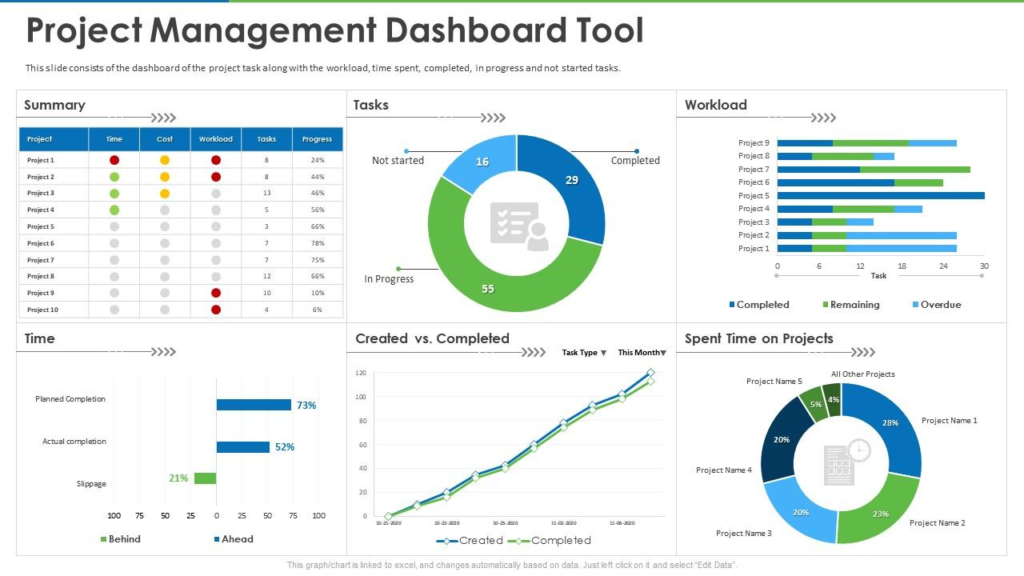
In today’s fast-paced work environment, managing projects efficiently is essential for teams of all sizes. Project management tools help organize work, assign responsibilities, track progress, and keep stakeholders aligned — transforming chaotic workflows into coordinated action. These platforms have evolved beyond simple task lists to become central hubs for collaboration, automation, analytics, and real-time transparency across departments and locations.
This article explores the top project management tools poised to lead in 2026, why they matter, and how they support real-world project success.
Why Project Management Tools Matter
Project management software isn’t just a digital to-do list. It’s a framework that enables teams to:
- Plan and schedule work — with timelines, calendars, and Gantt charts that map goals and deadlines clearly.
- Coordinate across teams — communicate, share files, and discuss updates in one place.
- Track progress and risks — monitor tasks, bottlenecks, resource use, and dependencies.
For a deeper explanation of how these tools impact productivity and outcomes, see this expert overview on project management platforms.
Core Features to Look For
Before highlighting individual tools, it’s important to understand the features that define a strong project management platform:
Planning and Scheduling
Timelines, task dependencies, Gantt charts, and calendars help teams visualize project flow and deadlines. These features ensure that work is sequenced logically and visible to stakeholders.
Collaboration and Communication
Integrated messaging, file sharing, and comment threads keep updates centralized and reduce dependency on email threads.
Reporting and Analytics
Real-time dashboards provide insights into progress, workload balance, and risk factors that influence decision-making.
Automation and Integration
Automated workflows speed up repetitive tasks, while integrations with calendars, email, and other business tools streamline daily work.
Top Project Management Tools for 2026
Here’s a curated overview of leading solutions that address diverse team needs — from startups to enterprise teams:
1. ClickUp – All-In-One Management
ClickUp is a versatile platform that combines task management, time tracking, documents, and reporting in one place. Its flexibility makes it suitable for teams that juggle varied workloads and collaboration styles.
Real-World Example: A creative agency uses ClickUp to sync design tasks, calendar events, and client feedback in a single view, improving project predictability and reducing email overload.
2. Asana – Balanced Task & Workflow Management
Asana excels at visual task planning and workflow automation. Its user-friendly boards and project templates make it popular with marketing teams, product groups, and cross-functional squads.
Use Case: A product team uses Asana to link feature requests with release milestones, enabling clear progress tracking and priority adjustments.
3. Jira – Agile Software Delivery
Jira remains a favorite among software teams for agile planning, backlog management, and sprint reporting. Its robustness supports large engineering teams with complex workflows.
Example: An engineering department tracks development cycles, bug fixes, and releases through Jira’s customizable workflows and sprint dashboards.
4. Monday.com – Visual Workflow Planner
Monday.com is known for its visually rich boards and automation capabilities. It’s ideal for teams that want straightforward planning with powerful customization.
Real-World Use: A remote operations team uses Monday.com dashboards to coordinate schedules, automate reminders, and visualize progress in real time.
5. Trello – Simple Kanban-Style Tool
Trello leverages a card-based interface that makes it easy to adopt for beginners or small teams. It’s particularly effective for lightweight task tracking and individual workflows.
Use Case: A content team organizes editorial calendars with Trello boards, color-coded task cards, and due dates.
6. Wrike – Enterprise-Grade Coordination
Wrike delivers advanced reporting, real-time analytics, and customizable dashboards for large teams. It bridges high-level portfolio views with task-level execution.
Example: A multinational team uses Wrike to align multiple project streams, balance resource allocation, and report progress to leadership.
Practical Advice for Choosing the Right Tool
- Match your workflow: Choose a tool that reflects how your team works — agile boards, Gantt timelines, or collaborative spaces.
- Consider scalability: What works for a small team today should adapt as your team grows.
- Evaluate integrations: Tools that connect with your existing stack (email, calendars, docs) reduce friction.
Conclusion
The right project management software can transform how teams plan, execute, and deliver work. Whether you need a lightweight solution for a tight budget or an enterprise-ready platform for sprawling portfolios, 2026 offers mature tools with rich features and real-world applicability. By aligning tool selection with specific team needs — and prioritizing clear communication, visibility, and automation — organizations can drive better outcomes and stay competitive in an increasingly complex work environment.

1 Comment
Pingback: Beginner’s Guide to Google Analytics - Blackbud